Showing posts with label ir-cut. Show all posts

Sunday, May 20, 2012

An Introduction to the IP Camera World


Today, no matter where you go, an IP (Internet Protocol, [1]) camera could have an EYE on you. This blog is about the world of IP cameras; IMHO, an emerging world about to explode with cameras almost everywhere, looking at almost everything!


And just as phones become larger, like tablets, and tablets become ubiquitous,  I believe IP Cameras are on the threshold of exploding onto the INTERNET scene. And it's a good thing we have all that dark fibre laying around-

..CAUSE WERE GONNA NEED IT!


Think about ALL the places that you'd like to watch? Wildlife, traffic, your children at play, weather cams, sports events, concerts and entertainment, airports, scenic areas, and every room in your house and every door and your yard, when you're away?

For starters...

Your interest in IP cameras is well-timed, because they are becoming affordable for *regular users*, even as the technology is improving (read about H.264). Yet, it's early enough where you can still get some darned good domains. I just picked up "ipcameras"- just goes to show ya it's not too late.

But the problem IS...  Where do you go to learn about IP cameras? What can one do for you? Which ones can you view now?  What kinds are there? Are they difficult to set up? To maintain? Expensive? Complex? Reliable? Secure?

You can go to a camera seller's site- all they'll tell you about is their products. 

Popular video sites normally tell you how to set up a specific camera.. No one is going to buy 12 cameras, and COMPARE them for you. It's hard to get general IP camera info from one place.

And IP camera forums? HMM I joined one AGES ago and I'm hoping SOME DAY the admin visits his own forum and APPROVES me so I can read the posts there! It's SO SECURE, NO ONE CAN join. It's been many days now- still waiting.  Maybe I just chose poorly :)

This blog is for and about IP cameras and the users who use them :) Is that you? Probably, if you read this far, it is.. It's not about any specific manufacturer, or camera type, class, feature, etc. I've been setting up and using IP cameras for years now, and the motivation to blog this is that I had a HARD TIME learning about the technology because the information is spread all over the net.

I'm trying to put it all here, in ONE place for you. One stop shopping.
I will of course NOT meet that objective, since I don't know everything about IP cameras, nor can I preconceive every question you might have.

Who am I to instruct you? I hold advanced degrees from major US Universities, in both sciences, and engineering. My specialties include optical properties, databases, computer networking, materials, and so on. Many of these are related to the world of IP cameras.

And I've been *fooling* with IP cameras for years.


So let's have some fun and look at the exciting world of IP cameras!


[1] - An IP , or Internet Protocol Camera, for our purposes, is a camera connected directly to a LAN network, as opposed to one connected to a USB (webcam) or an analog port (CCTV).

Friday, May 18, 2012

OK I Bought One, now Where Should I Locate my Camera?


Careful selection of your IP Camera location is critical for effective monitoring. Often an IP camera will have no operator to move, focus, or adjust the image quality, so where the camera is located is where it stays. There are many considerations.


General objectives are :
  1. to maximize coverage area
  2. to point at interesting things, or the things you want to monitor, in range and in frame
  3. to avoid obstacles like trees, or furniture that could block the view
  4.  to avoid pointing at harsh, or minimal light
  5. to be in a good location for Wireless reception, or wired access
  6. in a location with power source access
  7. sometimes, to be concealed
  8.  to avoid theft or abuse of the camera
  9. to maximize aesthetics
  10. to locate where the camera can easily be removed or repositioned
  11. to avoid harsh environment with dust, vibration, or interference
  12. to avoid very loud, or audio-isolated locations  
  13. if you want to cover an area with MULTIPLE cameras, do they overlap?
  14. center the camera on the most interesting or more vital area 
  15. to be close enough to distinguish objects, faces, etc

One approach is to work backwards.  Place the camera in a approximate location, then walk into the room or area and see if you can see the camera from all the locations you want to monitor. A PTZ (see post on camera types) camera can generally see almost ANYWHERE that you can see the camera, but a fixed camera can only see what the lens is pointed it.

Once you locate your camera, you'll want to look at the image on-screen (read later blog entries to see how to do this) to be sure you can see all you wish to see. You might also want to check it at different times-of-day to see how sunlight, traffic, or other changes affect the view.


In general, its preferable to have a camera INDOORS, or under cover, when possible. So if you want to monitor an entrance, its often better to place a camera indoors and monitor through a window. An indoor camera is not exposed to elements, is less prone to theft or vandalism, and is easier to configure and move. The only exception might be for cases where glare, or tinting attenuates or degrades the video quality, or where outdoor audio monitoring is required.

When finalized, secure the camera mount, secure the connections, then celebrate with a beverage of your choice!


Wednesday, May 16, 2012

What Kinds of Cameras Are Available?


There are many types of cameras.  Some cameras can be multiple types- for example BOTH wireless, and fixed.  This is a glossary of various camera types, and some associated terms. To read manufactrurer specs, or forums, you'll need to have an understanding of these terms.

Here are some you might encounter,  in no particular order:


IP (CAMERA):   a camera the connects directly to a LAN (Local Area Network) on a switch or router port, generally with its OWN webserver.  Opposed to a...

WEB (CAMERA): A camera, NOT AN IP Camera, normally connected through a USB port or capture card, to a computer, and normally accessed through windows services, or a manufactures proprietary system. These cameras do not have their own webserver, and need a computer to function.


PTZ (CAMERA): This is a common term in the IP Camera world, and it means PAN/TILT/ZOOM. I've noticed that it is used loosely- i.e. a PT (no zoom) camera might still be described as a PTZ camera. These cameras cover MUCH more area than their less-agile cousin, the FIXED camera. Pan and tilt are often measured in degrees- 320 degree pan is excellent. Tilt is typically 90 degrees or less.

FIXED (CAMERA): A camera with no pan/tilt control. A fixed camera MIGHT have zoom capability, but often it will not even have that. These cameras can usually be repositioned physically by moving their mount.

WIRELESS (CAMERA): A camera that can connect, usually securely, to a wireless LAN. A wireless camera might be PTZ, or Fixed. It might be indoor, or outdoor. Nearly always, a wireless camera will also have the ability to connect to the LAN wired (with a CAT-V connection). Most wireless cameras STILL require a wired power source, although some solar-powered camera discussions are starting to pop up.

WIRED (CAMERA): A camera that can connect only wired to the LAN  (with a CAT-V connection).

CCTV (CAMERA): generally these are not considered as IP Cameras per-se, although often the system to which they connect has a webserver, so they can functionally LOOK like an IP Camera. These cameras usually have an analog A/V connection to a central computer, or a stand-alone DVR that records from them. They are often used it sets of 2,4, or 8, for video surveillance.

H.264 (CAMERA): this is a rather new HD standard inspired by BluRay Technology with superior video compression. Oddly, some cameras boast H.264 capability, but offer only 640x480 pixels, which most would NOT consider HD video. When camera shopping, this is a useful term to search for, as only the latest, and most capable cameras would support this standard.

Blue Iris (software): this is a software package that supports IP and other cameras.

 DVR - a recording system, normally digital, and almost always onto a hard drive, and often with multiple camera sources.

Video Capture: a camera such as a video camcorder, with an interface that allows it to communicate to a computer.

Motion Detect (Camera): This type of camera has firmware that can trigger events such as ftp, email, or alarms, when motion is detected (a threshold of pixels change at a threshold rate).

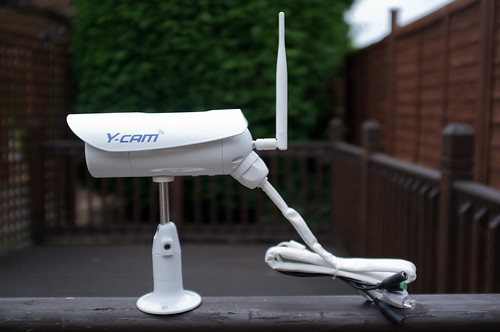
IR (Camera): Normally a camera capable of night vision. A camera of this class that cannot be CUT (see below) often has perceptible washed out colour. IR camera nighrt vision is usually reported in meters, or feet, of night vision, which is also a function of how many LED's it has. Some have 1 ring, some 2, some 3. Generally the more meters or IR capability, the better the night vision quality.

IR-CUT (Camera): An IR camera that has the capability to CUT the IR function in lighted views. These are now emerging as a new requirement as users are generally unhappy with IR camera quality in lighted areas, with no cut.  IR cameras, without IR-Cut, might try to minimize the IR effects by attenuating the IR level. This generally is not sufficient to remediate the image color problems (washing).

Audio (Camera): A camera that can also detect and transmit audio signals.

2-way audio (Camera): A camera  that can also detect and transmit audio signals, but ALSO can BROADCAST audio into the area. These are useful as 2-way communication, or to make broadcasts such as WARNING- YOU ARE PRESENTLY BEING MONITORED!


Hidden (Camera): In some situations, a camera might be hidden to avoid detection.

LED (Camera): A camera with a blinking or static LED, to announce its connection, power, or other status.


Torpedo (Camera):  A tubular-shaped camera normally with a fixed mount. These are often also fixed.


Dome (Camera): A camera mounted inside a glass or plastic, and often smoked dome. These cameras generally cannot support night-vision because the dome prevents IR detection.  These are often seen in store or casino surveillance systems, or mounted in parking lots on poles, etc. They are often PTZ cameras. Sometimes the dome assembly can be purchased separately to house an IP camera. Normally, Dome cameras are mounted inverted, so the image must be reversed and mirrored with software.

TF or SD (Camera): A camera with a slot for an SD or TF card to record photos or video.

Embedded ap, or firmware: The manufacturer's webserver and PTZ control software embedded into the camera, and usually can be updated with revisions.

Open IP (Camera):  A IP camera with no password, or a public password, that is generally accessible by the public through a browser. Some of these are intentionally accessible, some may not be, but none-the-less, are. There seems to be controversy and much discussion over whether its permissible or proper to view an open IP camera that was not INTENDED to be open. The consensus seems to be if its NOT pass-worded, its OK to visit. I cannot comment on the legalities of this position, but it *seems* as if that's probably true.

Home IP (Camera): A hobbiest-quality camera, often under $100, most often plastic, with limited zoom or recording ability.


Pro IP (Camera): A professional camera, often over $1000, far more durable and reliable than a home camera.

Zoom (Camera): A camera with optical zoom capability. Lower-end camera support 2-3X zoom , hi-end (over $1000) cameras might support 16X zoom or better.


Dummy or Fake  (Camera): A device that LOOKS like a camera, but in fact is not. These sometimes have LED's to make them look more real.


Friday, March 9, 2012

Outdoor? Indoor? Wired? Wireless? So Many Options!

IP Cameras are generally either for (a) indoor use, (b), outdoor use, or (c) both. Also, any of these types can be (a) WIRED, or (b) WIRELESS.


OUTDOOR use cameras are weatherproofed, and that capability will cost you. These have to be waterproof, UV resistant, wind resistant, and able to endure temperature swings. The wiring needs to be hidden or resistant to elements. The mounts tend to be sturdier. Some of the more expensive outdoor cameras even have built-in heaters for colder climes.


INDOOR cameras tend to be made of plastic, are lighter, less rugged, and are often less expensive than their outdoor cousins.


DUAL-USE cameras are actually outdoor cameras that can be ALSO used indoors. Presumably ALL outdoor cameras might be considered to meet this spec, but in reality that's impractical. For example, some DOME cameras (read about DOME cameras in a later entry, here) are specifically made to mount on a pole, and aside from a certain type of club (where in fact an IP Camera might be very popular!), most homes don't have poles indoors. Other outdoor cameras are bulky or unsightly for indoor use.

So generally you won't find a camera touted as *dual-use*. It would instead be an outdoor camera that you could bring indoors.


WIRELESS camera is a bit of a misnomer, since in truth, almost all IP cameras are wired to a power source (but send their data wirelessly to a router). Generally users choose wireless connection when they want mobility, such as for a tablet PC, a cellphone, laptop, etc. Yet many, perhaps even most IP cameras are in fixed locations, mitigating the typical wireless advantages. Yet wireless cameras are becoming common as wired are *yawn* old-school.


I believe most home users, including ME, choose wireless out of laziness, and the *coolness* of it. I even have one camera not more than 8 feet from a cat-V connection, yet it's wireless! 


Wireless cameras present challenges. They are far more difficult to set up, and they tend to be less reliable than their wired cousins (note- most wireless cameras can optionally be set up as wired).  Also, they are less secure, far more prone to interference, and transceive data at a much slower rate. 

But despite all the drawbacks, wireless is THE WAY TO GO.  In some locales, particularly outdoors, it's difficult to run CAT-V, or outside the range unless you add a repeater. And Cat-V may not cohabitate well with a 120v 60Hz adjacent wire, over a long run in conduit. Inductance would NOT be your friend :)


WIRED Cameras are common in the CCTV arena (see the next post for definitions), but not so common for networked cameras. They offer better speed, more stability, and more security, but all at the price of being tethered to a switch or router. And if you plan to install say 8 or more cameras, well most of us don't have that many open CAT-V ports.


Look at the next entry for a more detailed look at cameras types. 


Friday, February 24, 2012

What is DDNS and Why Do I need it?

DDNS stands for Dynamic Domain Name System.  This is a very-tekkie discussion of DDNS, in more detail than previously presented.


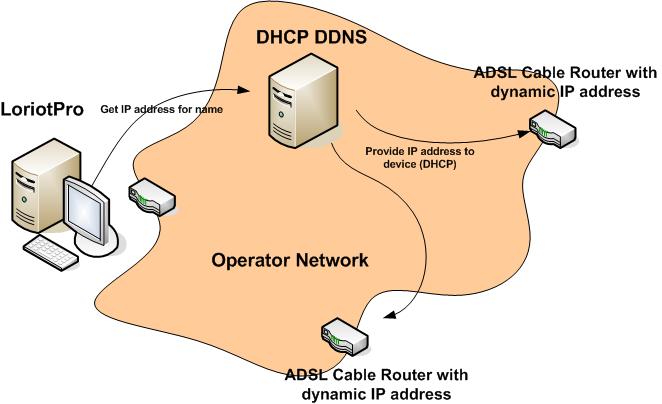
Each website, FTP site, device, and even your cable modem, has an Internet ADDRESS. This address is how the Internet locates nodes, aka computers, or routers, or anything else that might hang on a CAT-V cable [1].

The numbers aren't *too friendly* however. They're hard to remember and for the most part, meaningless as far as their significance. Think about it. If your friend says 

Did you check out my latest pix on 66.220.149.11??

You'll be like HUH? But if they instead say

Did you check out my latest pix on Facebook??

THEN you'll know what they mean right? Well on the INTERNET, FACEBOOK is the domain NAME (at least part of it), and 66.220.149.11 is the Internet address for that name. This might be called the IP Address, or even the WAN address.

So they have to have a system that can TRANSLATE a name into an address,  so when you enter FACEBOOK into your browser, it knows to send you to 66.220.149.11 , and that's what a DNS or Domain Name Server, does. This is called NAT, or Network Address Translation.

So that's a little bit of background for you.  Now what about DYNAMIC DNS (DDNS)?

You actually could get a NAME and a FIXED IP ADDRESS [1] for your camera, and never worry about DDNS. But for most of us, that's impractical. A fixed address is expensive. So instead let's look at DDNS.


Your CABLE or other type of provider temporarily assigns an IP address to you. They own a pool of FIXED UP Addresses, which they dole out to their subscribers on a round-robin or other type of sequence. So when you woke up this morning, your IP address could potentially be different than it was when you went to sleep.

In practice they don't really change that often. If your router hasn't been off line, its possible to have the same IP Address for weeks, or months. In that scenario, you might consider just using the current IP, not worrying about DDNS, and resign yourself to having to adjust it ever month or two. Or six.

But if you want your Camera to automatically be ADJUSTED to use the new IP address, then that's where DDNS shines.

Here is how it works. 

You sign up for a DDNS service. There are dozens. Some are free, some charge $1-2 a month, others more. One caveat- your selections may be limited by your camera or router, read on..

Next, you need to configure one of your devices to *talk to* your DDNS provider. You can locate DDNS settings in your router, camera, and even on some computers.

Then you configure it to tell your DDNS provider about your IP address. When it changes, it tells the DDNS provider, and it adjusts your NAT (Network Address Translation) so someone who types in tammycam.com ALWAYS finds you, even if your address changed.

For details on settings at both the DDNS provider and your router or camera, you'll have to consult the associated guides. They're all different. 

But the part to remember is that many devices can only support CERTAIN DDNS providers. You'll find the list in that guide. Be sure to select one in the list. The other important thing is that you only need ONE device to communicate to the DDNS provider, so you can select it based on which is easiest to configure, which is always-on (like your router), etc.

With lots of study and some trial and error, you can set-and-forget this and never have to worry about it again (hopefully!)..


[1] Most network connections are made with CAT-V cable. The connectors look like really big telephone jacks (remember those?)..

[2] a FIXED IP Address is one that stays the same, and essentially you OWN (or, more often, lease) it. A fixed address is expensive, and for most consumers, not used.

Thursday, February 23, 2012

What Can My IP Camera DO Besides Showing me Images?

Good question.

If you're not a surveillance company glued to a wall of monitors, you probably don't have time or patience to sit and watch your IP Camera 24x7. And if you watch even an hour a day, you're only monitoring about 4% of the time.


But you're in-luck (probably), because many contemporary IP camera offer tools for round-the-clock monitoring. Here are some:


1. Motion Detection (MD): Many IP cameras can detect motion, which in-turn triggers an event.  An event might be turning on a siren, or texting a photo to your phone. 

Motion-detection can be difficult to *dial-in* however, since you have to set thresholds. You have to instruct your camera how much of the image has to change, in how little a time-span, to trigger. With pets walking about, branches waving in the wind, rainstorms, too-low a threshold can produce false triggers. And too high can miss real events. 

So MD is useful but you may have to experiment to get the camera isolated from false triggers, and also experiment with thresholds.


2. FTP: your IP camera may support FTP, where an image is sent to a disk on some interval, or on a trigger like MD. Like a *poor-man's-DVR* this is essentially a slide-show view of the scene.

Some FTP systems can also transfer video clips, or even audio clips.

3. EMAIL: Your camera can email you. This service can be difficult to set up as it seems to require an SMTP(Mail Service) server, but it can be done with some config settings. If you set up your pop-client on your PC, you can probably set up this.


4. Two-way audio: You can broadcast audio TO The camera area with your cellphone or PC microphone. Why would you want to do THAT? Say Fido has been getting into your garden digging it up while you're at work? You set up MD on the garden, get an alert, look at your cell, and THERE Fido, digging. 

You get into your IP Camera phone ap, press TALK, and say GET OUT OF THERE FIDO!

FIDO looks totally confused, and wanders off.

Of course there are far more sinister activities you can intercept, such as a burgler. I'm thinking Mr Burgler hears STAY RIGHT THERE, I'M LOADING THE SHOTGUN out of the darkness, he's headed for the nearest door!


Even though all of these utilities can be very useful and even life or property-saving tools, I expect with the explosion underway we'll see even more utility of IP Camera like interfaces to social media, podcasting, etc.

Have fun!


Wednesday, February 22, 2012

Can I FOCUS an IP Camera?


..not really. Like point-and-shoot cameras, most IP cameras do not have a manual focus. This is generally not a problem however, since the objects in view are distant enough to not require focusing.

And also like point-and-shoots, you cannot vary the depth-of-field, aperture or F-Stop settings, so a shot like this would not be easy!


You can, in some cases, find alternate lenses for your camera. I've seen wide-angle, fish-eye and other options. Note that since these lenses tend to distort the photo geometry, they may not be useful for details like facial recognition, license-plate legibility, etc.

You can also sometimes find interchangeable lenses which offer other lens diameters.

What WOULD be nice, but I haven't seen, are UV or other filters.

I have noticed that some IP Camera controls do offer focus- so I tend to think that some manufacturers probably offer it. I haven't seen one yet, however.


Tuesday, February 21, 2012

How do I Mount and Install an OUTDOOR IP Camera?


...coming soon!


What software do I need for my IP Camera?


Starting with a question- what software do you (probably) already have? Correct- some flavour of Microsoft Windows, and Internet Explorer.  That means that for like 90% of IP Camera, you already have MOST of what you'll need.


Unfortunately for linux or BSD or other OS-users (AIX?), it's gonna tough for you to use an IP Camera unless you're particularly handy and clever. Even in Windows, its not always easy.


The main challenge is the video content, and how to display it. I see ACTIVE-X as the most common transport, which is both good and bad. The bad news- you probably don't already have a compatible copy of Active-X on your system, which means you have to load it. Luckily you'll probably get prompted to load it (if not you may have to fiddle with IE Security settings).

The other problem is, many suppliers offer unsigned-copies of Active-X, which likely means even MORE fiddling with security settings to get it loaded. In IE these settings are found in the CUSTOM ZONE menus. Look for the radio buttons that allow prompting for download of Active-X in various states (ie, unsigned).

Life can be a bit simpler if you need less functionality, and you elect another transport like server push, or VLC. Those may also need plug-in installs, but they can be less-daunting than Active-X.


If you're actually INSTALLING the camera, you may also need the software from the camera seller, provided on CD, DVD, or downloaded from their site. It seems that unlike modern routers, you can't just plug the camera into a CAT-V cable, type 192.168.1.N into a browser, and voila there it is! Loftek and others provide *discovery software* that sort of locates the camera, and leads you through some steps to do preliminary configuration. I believe much of this will soon vanish- early routers had this same issue, but quickly evolved past it. But for now you may need to install and run this from the Camera's CD or website.

There are various other utilities and software you might need such as DDNS-disable, net-config, etc. These should be described on the camera webpage, or in the manual.

Once you're set up and stable, you won't need to worry about all of this again unless your settings go haywire. Pray that doesn't happen!


Sunday, February 19, 2012

OK I Want an IP Camera- How do I get one ON A BUDGET.


You can get some great deals on IP Cameras, if you're willing to (a) take some changes, (b) live with poor or no customer service, (c) get used gear, (d) possibly have to return for a , and replacement, and (e) live without leading-edge features.

Having said all that, here is my my personal strategy. Personalize this for your own use!
  1. Go to AMAZON.COM . Search for IP CAMERA
  2. sort by price, lowest first.  Start drilling down on some of the more attractively-priced options
  3.  look at the 1-off sellers, that is, Amazon sellers who sell on Amazon, but are not Amazon proper.
  4. Check their feedback, and even send them a message (to see how quickly and comprehensively they reply)
  5. When you're confident you found a bargain, and you trust the seller and his feedback, order a camera
  6.  When you get the camera, inventory and test it quickly. If there is a problem, message the seller quickly. It may not be an issue if software is missing - check the manufacturer's site for downloads.
As I check today, I see most indoor PTZ IP Cameras are in the $100 or so price-range, yet using these steps, I see some under $50, NEW! That's a nice savings.

And if you're an Amazon Prime member, you may get even more discounts.


In contrast, I checked EBAY and although I found many options, I found higher prices, in general.  The best Foscam deal I found was about $75 shipped, which isn't bad, but is of course not $50 !

NOTE- this selections are not H.264, so you're gonna give up some  image quality in return for your savings.
Happy shopping!


Friday, February 17, 2012

What is an OPEN IP Camera?


Historically, IP Cameras have been *focused* on monitor and surveillance, and locked down for the people who are designated to monitor them. I personally think this is about to change, because that's only ONE application, and there are both millions of things people want to watch things, and millions that people want to show things.

Presenting the OPEN IP Camera, which is, in short, a camera with no password protection, or perhaps one with a known, public password. Although technically the latter would not be open per se, but it sort of fits the definition of being open.

 Your IP camera is on your walkway to your door? OK, maybe that's not a great candidate for an OPEN IP camera. What about an IP Camera on Mount Rushmore? An active bird's nest? Jackson Hole?

But wait..  You don't have to live in a historic or scenic area to offer up some interesting cam shots. How about your AQUARIUM? Your garden? Your shop?

Surprisingly there are few sites with OPEN IP camera links. I plan to start one on ipcameras.us soon. Be part of the revolution and all!

So there you have it, not much else to say on this topic, share your thoughts?


Thursday, February 16, 2012

Is an IP Camera MOBILE?

The short answer? NO!

You generally won't be toting your IP Camera into Barnes And Noble, glomming onto their wireless connection, and broadcasting your reading-self.  But I suppose you could, perhaps.


But for medium stays like an overnighter, weekend, etc. it could be practical to set up and deploy an IP camera.  The problem is, each time you move, you'll need to reconfigure the camera, your router, even your DDNS provider and potentially even your domain provider. And since it can take hours to propagate a domain change, in some cases, this just isn't practical.

But let's say you live on a boat, and move around a lot. But at the same time, you tend to stay in one place for a week, or even a month or two. And you'd like to have a camera on the boat [1]. In that case you have some options. One, you can set up for the presiding wireless service, get the IP and port, and mail or text it off to your audience. But unless you can make changes to the wireless router, that can't happen. Read on.


You probably won't have access to the wireless router's port-forward or DNS settings, so you really can't configure your camera to respond over the WAN. Remember, the router has to know where to route requests to see your camera, and on a public net, and they are not likely to let you broadcast off of port 80 (the default for HTTP).

This is potentially a show-stopper. But maybe you can *buddy-up* to the Wireless LAN provider and get him to sneak a port-forward in for you! And a FIXED IP for your camera.  If you visit the harbour annually, perhaps the person would be willing to just leave the setting there- and even *time-share* it so others can use it when you're not there.
What if you have a domain name for your camera? Well that's a bit stickier, but even that can be somewhat mobile. You redirect your DDNS to your current IP/Port, and you should be online again in seconds. Read more about that in my post on IP Camera Domains.


If the router-admin grants you access, well, I guess you'd owe him AT LEAST a beer for that! Or two.

Happy mobility!


[1] this is actually a WONDERFUL idea- a PTZ camera (read about camera types in an earlier post), hi up on a mast, would potentially have splendid panoramic views of the harbour, waters, boats and more.

Who can VIEW My IP Camera, and from Where?

"What really sets IP Cameras apart is the ability to view them from anywhere."

With a few fairly simple actions, an IP camera can be configured to view from your smart phone, or any browser worldwide. Sounds amazing?  It is!

Our friends and family  get a great sense of security and virtual presence at home as we view our 4-5 cameras showing us every door, and the interior.  I can pan/tilt my outdoor cameras to see pretty my my entire yard, the street, and even adjacent buildings.


We can check on our home and pets while travelling, out on the water,  at work, whenever and wherever we are (except perhaps when SCUBA diving!)..

Is this secure? It sure is. Modern IP cameras have built-in security- the usual assortment of WEP, WPA, WPA2, etc.

And using the camera interface, you can force users to enter a username and password to view any images. In fact many PTZ cameras offer multi-level access, where you can allow users to view, view and MOVE the camera, or administrate- your choice.

The steps are easy:
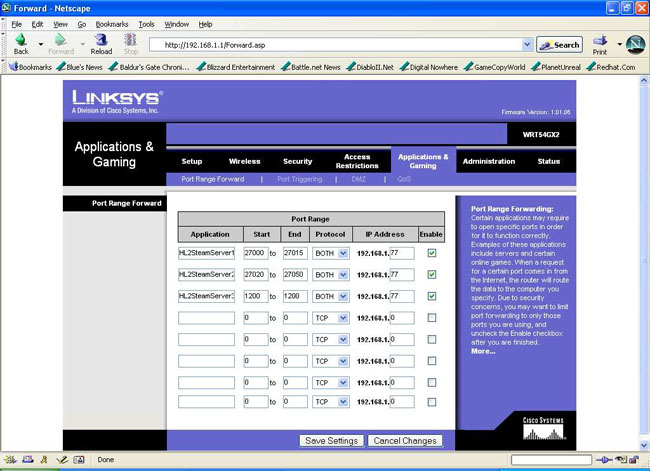
  1.  choose a PORT to use as your broadcast port. It needs to be > 1024, and unused.
  2. set up your camera on your LAN. You'll want to set it up with a FIXED IP address (don't select DNS). Normally this address would be 192.168.1.XXX where XXX>128. Check your router status for unused ports.
  3. In the same camera admin network page, and set it up to broadcast on the SAME port you selected.
  4. Next, go into your router admin page, and find the page to set port forwarding. Then add the port you selected, and point it at the IP address you chose for your camera.
  5. Repeat 1-4 once for each camera you have, each time selecting unique IP's and ports.

and Bingo- you're WORLDWIDE! You can access your cameras anywhere using the IP Addreses from your provider. You can determine THAT by checking your router WAN status or at a number of websites like this one.

Say your provider set you up on 46.43.66.55 (which you found in your router status, or from a WAN IP website). And you chose port 2222 for your camera. Just point your browser at 46.43.66.55:2222 and there is your camera! From anywhere.

You can ALSO view it from inside your LAN, using the local FIXED ip for the camera, and the port, such as 192.168.1.203:2022

But that ONLY works from inside your LAN. The WAN address works from anywhere on the internet.

For smartphones there may be another step, where you set up the MEDIA PORT to point at another port, say 557. In this case, select an unused port between 500 and 600, and add that to port forwarding too (step 4). This step may not be necessary, but certain apos may require it. I recommend IP CAM BASIC as the ap to use for your IP camera viewing from your Android.

Say you want a REAL web-page- not a number? I tell you how to do that in another post, where in a matter of minutes you can set up your camera with a name you select, for example:

http://frontyard.mycoolcam.com

Having fun yet?

Wednesday, February 15, 2012

Who Sells 'Em, and Where Can I Buy an IPCamera?


If there was such as thing as the gold standard of (home use) IP Cameras, I would have to nominate FOSCAM. In fact, many other cameras are described as FOSCAM clones, or rebranded FOSCAMs. So for now, I'd call them your leader of the pack.


And in fact it's true that many companies seem to rebrand. I don't know all the details of how much they *value-add* the product. Many seem to use identical hardware, and install their own firmware which includes their custom webserver.

Some of the names you might find include WANSVIEW, LOFTEK, EasyN (which curiously is generally NOT Wireless-N capable), VideoSecu, Hootoo, and Agasio. Most of these companies offer comsumer-use cameras in the $80-$200 range, some suprisingly feature-rich. For example, the Loftek Sentinel D-1, a personal favorite and one I own, is an outdoor Dome camera with 3x Zoom for well under $200 US.


Some bigger players, many of whom offer professinal products, and tend to have their own custom hardware include players like Trendnet, Linksys/Cisco, D-Link, Planex, Logitech, GE, Lorex, Grandstream, Toshibe (not a typo), CP Tech, and Vonnic. There are dozens of others.  Some of these companies offer consumer-quality products, particularly familiar names like Cisco and Logitech.  But many focus on hi-end pro gear.


..and what about TECH SUPPORT?


Well many of us are familiar with support from Logitech, Cisco, and other well-known companies, and in most cases, it's excellent.


From the lesser-known sellers, they try, but often fall short of providing assistance. There are language issues, and there seems to be significant delays, if they respond at all. I view all of that as sort of the price-you-pay to get discounts. 


For a tekkie, like me, it's no big deal. In fact it can even be an advantage to deal with small companies with few resources, because they have less rigid policies and standards. Ask Logitech for the SOURCE CODE for one of their camera's webserver; you pretty much KNOW what that answer is! But a smaller company might provide it. I had one provide me with much of the internal code detail already (which I hope to rewrite for my own customizations).


And shopping?


Where is the place to shop for IP cameras. Online, you can find a huge selection of providers, and products on Amazon (amazon.com). Search for IP camera, you'll get the idea! The major sellers seem to offer products here. You may not find many options for discounted used IP cameras here since many of the products are recently introduced. Users haven't had time yet to get frustrated or bored with them!


Of course Amazon's rival, EBAY also has a plethora of options you can discover with the same search. Sort by price to see the discounts. And provided that the lens and mechanism are not damaged, EBAY often has many viable used choices as well. Normally missing software is NOT a problem as you can often download your drivers and updates, but check first with the manufacturer's site.


You can sometimes order directly from the manufacturer's or seller's site- Foscam.us for example. You might pay a bit more on those sites however- since on the major auction and retailer sites, there are lots of competitors.


You might find some IP cameras in the big-box B&M stores too. I personally wouldn't bother- they will not offer tech support from the store, the prices tend to be higher (gotta pay the rent!) and the options are fewer.


So stay in your budget, and if you're a newbie, but ONE camera first and get the feel of what's involved. Read the reviews (amazon has tons of them!). And most of all have fun!